App gratuita per macOS
Free app for macOS
Kick1200
Il tuo Amiga 1200, in un clic. Porta la tua Kickstart, il tuo Workbench e i tuoi giochi: Kick1200 li prepara e avvia un Amiga emulato, con il Workbench dei tuoi ricordi e un vero monitor a tubo.Your Amiga 1200, in one click. Bring your own Kickstart, Workbench and games: Kick1200 sets them up and starts an emulated Amiga, with the Workbench you remember and a real tube monitor look.- GratuitaFree
- macOS 14+
- Apple Silicon e IntelApple Silicon and Intel
- Open source (GPL v3)Open source (GPL v3)
- IT · EN · DE · FR · ES

Tre passi, poi si gioca
Three steps, then you play
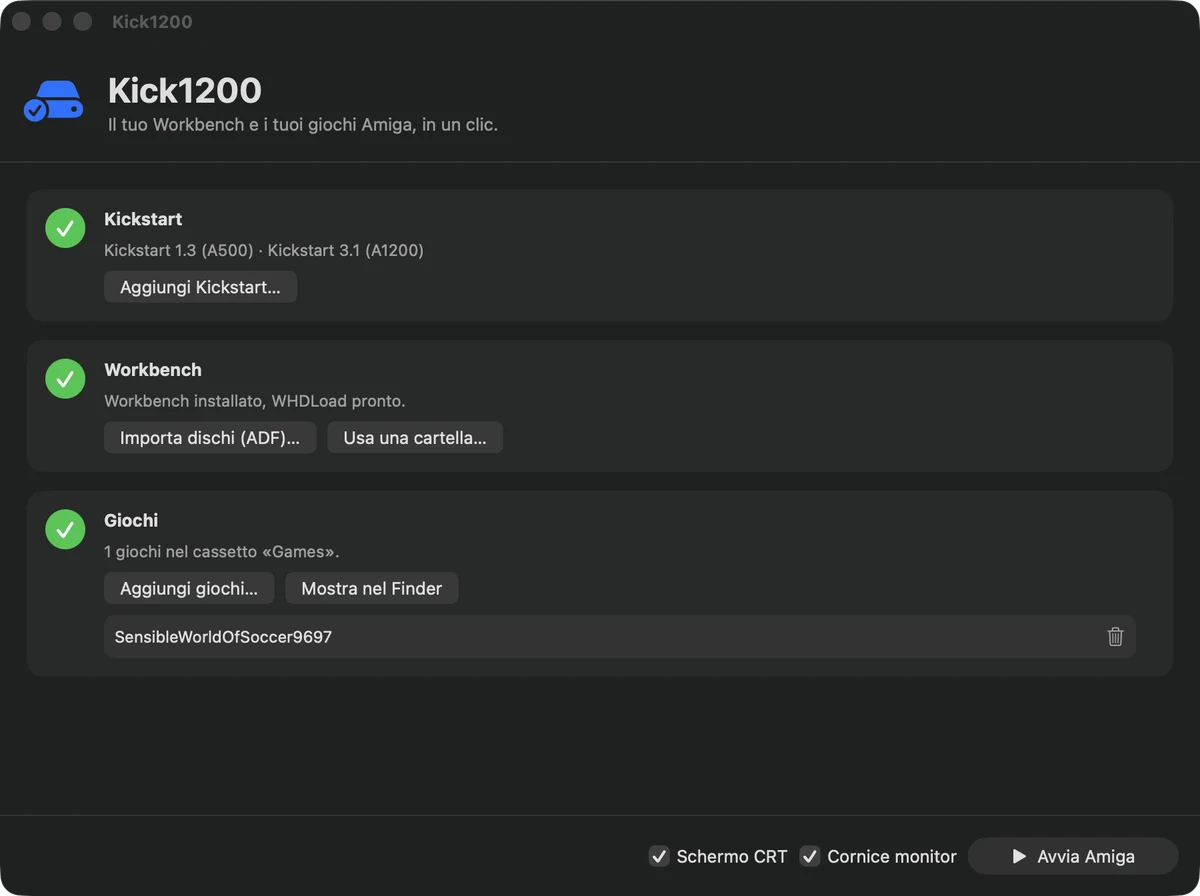
Tutto quello che serve è tuo: Kick1200 non contiene nessuna ROM, nessun Workbench e nessun gioco.
Everything you need is yours: Kick1200 contains no ROMs, no Workbench and no games.
Kickstart
Kickstart
Aggiungi la ROM Kickstart 3.1 del tuo Amiga 1200. L'app la riconosce da sola, insieme alle altre che hai (1.3, 2.05, 3.0).
Add the Kickstart 3.1 ROM of your Amiga 1200. The app recognises it by itself, along with any others you have (1.3, 2.05, 3.0).
Workbench
Workbench
Trascina i tuoi dischi originali (file .adf): Kick1200 ricostruisce il Workbench 3.1 con font, lingue e utility, e prepara WHDLoad.
Drop your original disks (.adf files): Kick1200 rebuilds Workbench 3.1 with fonts, locales and utilities, and sets up WHDLoad.
Giochi
Games
Aggiungi i pacchetti WHDLoad (.lha o .zip). Compaiono nel cassetto «Games» del Workbench, come sull'Amiga vero: doppio clic e si parte.
Add WHDLoad packages (.lha or .zip). They appear in the “Games” drawer of the Workbench, just like on a real Amiga: double-click and go.
Quattro modi di vedere l'Amiga
Four ways to see your Amiga
Due interruttori, quattro aspetti: piatto e moderno, oppure schermo a tubo; con o senza la custodia del monitor.
Two switches, four looks: flat and modern, or a tube screen; with or without the monitor case.
- Schermo CRT: scanline, vetro leggermente bombato e un velo di bagliore, come un monitor a tubo.CRT screen: scanlines, slightly curved glass and a touch of glow, like a tube monitor.
- Cornice monitor: la custodia beige attorno al vetro, con il tuo schermo il più grande possibile.Monitor frame: the beige case around the glass, with your picture as large as possible.
- Sempre 4:3: l'immagine non viene mai deformata.Always 4:3: the picture is never stretched.
- Una cornice tua: se vuoi, sostituisci quella inclusa con un PNG personale.Your own frame: if you like, replace the bundled one with a PNG of your own.
Cosa serve e cosa no
What you need and what you don't
Devi avere
You must have
- La Kickstart 3.1 del tuo Amiga 1200.The Kickstart 3.1 of your Amiga 1200.
- I dischi del Workbench 3.1 (file .adf).Your Workbench 3.1 disks (.adf files).
- I giochi che possiedi, in formato WHDLoad.Games you own, in WHDLoad format.
- Una connessione a Internet la prima volta, per scaricare WHDLoad.An Internet connection the first time, to download WHDLoad.
Non c'è dentro
Not included
- Nessuna ROM, nessun Workbench, nessun gioco: sono tuoi.No ROMs, no Workbench, no games: they are yours.
- Nessun logo o marchio di terzi: Kick1200 non è affiliato né approvato da chi detiene i marchi Amiga e Commodore.No third-party logos or trademarks: Kick1200 is not affiliated with or endorsed by the owners of the Amiga and Commodore trademarks.
Domande frequenti
Frequently asked questions
È legale?
Kick1200 è solo l'emulatore e il suo guscio: non include nulla di protetto. Usa solo ROM, Workbench e giochi che possiedi legittimamente.
Is it legal?
Kick1200 is only the emulator and its shell: it includes nothing protected. Use only ROMs, Workbench disks and games you legitimately own.
Come si esce da un gioco?
Dipende dal gioco: WHDLoad lo scrive nella schermata iniziale (di solito F10 o Canc). Sul Mac, Canc è fn + Backspace.
How do I quit a game?
It depends on the game: WHDLoad shows it on its start screen (usually F10 or Del). On a Mac, Del is fn + Backspace.
Perché i giochi sono in formato WHDLoad?
Perché partono da disco rigido, senza cambiare dischetti, e si lanciano dal Workbench con un doppio clic. Sono pacchetti .lha o .zip che si trovano nelle raccolte WHDLoad.
Why WHDLoad games?
They run from a hard drive, without disk swapping, and launch from the Workbench with a double-click. They are .lha or .zip packages from WHDLoad collections.
Quali Mac?
macOS 14 o successivi, Apple Silicon e Intel.
Which Macs?
macOS 14 or later, Apple Silicon and Intel.
Costa qualcosa? È open source?
È gratuita e libera (GPL v3). Il motore è Amiberry di Dimitris Panokostas e BlitterStudio, WHDLoad è di Wepl.
Does it cost anything? Is it open source?
It is free and open source (GPL v3). The engine is Amiberry by Dimitris Panokostas and BlitterStudio; WHDLoad is by Wepl.
Dove sono i miei dati?
Tutto sta nella cartella Kick1200 dentro «Libreria/Application Support» del tuo utente. Per ricominciare basta cancellarla.
Where is my data?
Everything is in the Kick1200 folder inside your user's “Library/Application Support”. Delete it to start over.